If you’re working with Google Apps Script, creating calendar events programmatically is a very common need, especially when building internal tools, workflows, or automation.
However, CalendarApp does not support generating Google Meet links. This article shows a simple and practical way to work around that limitation.
Enable the Calendar Advanced Service
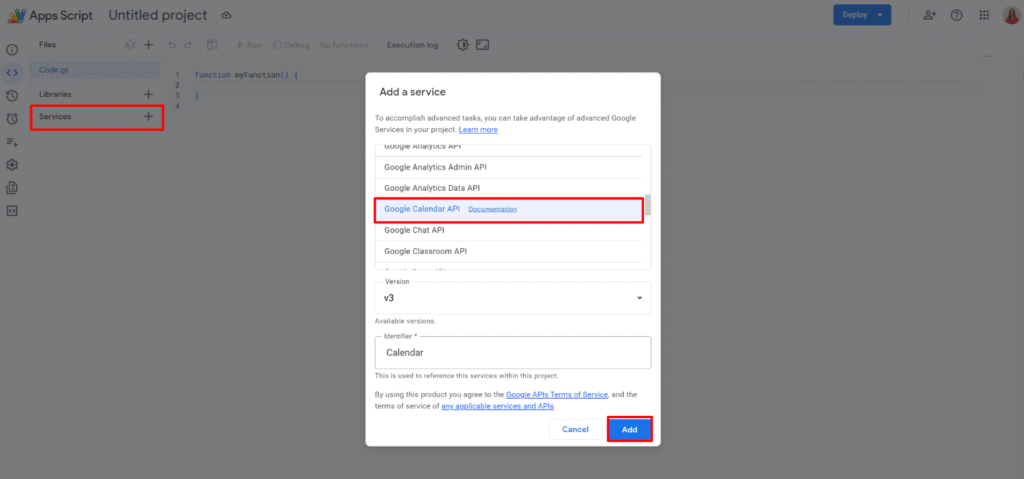
Before writing any code, you need to activate the Calendar API inside your Apps Script project.
Open your project, go to Services (+), and add Calendar API. This exposes the Calendar.Events namespace that we’ll use next.
The script
Here is the simplest possible version to create a meeting with a Google Meet link:
/**
 * Create a Google Calendar event with a Meet link
 * @returns {{eventId: string}}
 */
function createMeeting() {

  const resource = {
    summary: "Demo Meeting",
    description: "Created with Apps Script",

    start: {
      dateTime: "2026-04-01T10:00:00",
      timeZone: "Europe/Paris"
    },
    end: {
      dateTime: "2026-04-01T11:00:00",
      timeZone: "Europe/Paris"
    },

    attendees: [
      { email: "person1@email.com" }
    ],

    conferenceData: {
      createRequest: {
        requestId: Utilities.getUuid(),
        conferenceSolutionKey: {
          type: "hangoutsMeet"
        }
      }
    }
  };

  const event = Calendar.Events.insert(
    resource,
    "primary",
    {
      conferenceDataVersion: 1,
      sendUpdates: "all"
    }
  );

  return { eventId: event.id };
}
Conclusion
Even though CalendarApp doesn’t allow you to create a Google Meet link, you can use the advanced Calendar service (essentially the equivalent of calling the Calendar API via UrlFetchApp) to do it.
By building the right event object, especially the conferenceData part, you unlock full control over meeting creation and can adapt it to any workflow.