When working with Google Forms + Google Sheets, a common setup is to connect several forms to the same spreadsheet. Each form creates its own response sheet automatically.
This works well at first. But as soon as you want to automate workflows with Google Apps Script, things become messy.
Typical situations:
You have multiple forms for different processes (client onboarding, support requests, event registrations, etc.)
Each form writes responses into a different sheet of the same spreadsheet
You want to trigger different automation logic depending on the form
The issue is that the Form Submit trigger in Google Sheets does not allow you to specify a different function depending on which form submitted the response.
The approach I use is to create one global trigger function that runs whenever a form submission occurs. This function then routes the event to the appropriate handler, based on the sheet that received the response.
A Single Dispatcher Trigger
The e object returned by the trigger provides the context of the event. From it, we can retrieve the range that triggered the execution, then access the sheet, and finally obtain the sheet name using function chaining.
const sheetName = e.range.getSheet().getName();
From there, we can decide which process should handle the submission.
Here is an example which can be easily
function Main_FormDispatcher(e) {

  // Get sheet name to retrieve what form was submitted
  const sheetName = e.range.getSheet().getName();

  Logger.log(`Form response received from sheet: ${sheetName}`);

  // Dispatch event
  if (sheetName === "Client Intake Responses") {
    processClientIntake(e);
  } else if (sheetName === "Bug Report Responses") {
    processBugReport(e);
  } else if (sheetName === "Newsletter Signup Responses") {
    processNewsletterSignup(e);
  } else {
    Logger.log(`Unknown form sheet detected: ${sheetName}`);
  }
}
If you regularly build Google Workspace automations, structuring your scripts around dispatcher functions like this one will save you a lot of time and complexity later.
When your Apps Script project is just one tiny function attached to a Sheet, you can get away with “click Run and hope for the best”.
But as soon as your codebase grows, multiple files, complex business rules, integrations with Sheets, Docs, external APIs, that approach stops scaling. A small change in one function can silently break something completely different.
That’s where unit testing in Google Apps Script comes in.
In this article, we’ll cover:
What unit testing is and why it matters for Apps Script
The current landscape of unit testing solutions for GAS (QUnitGS2, GasT, Utgs, Jest + clasp, etc.)
Classic unit testing principles adapted to Apps Script (AAA, dependency injection)
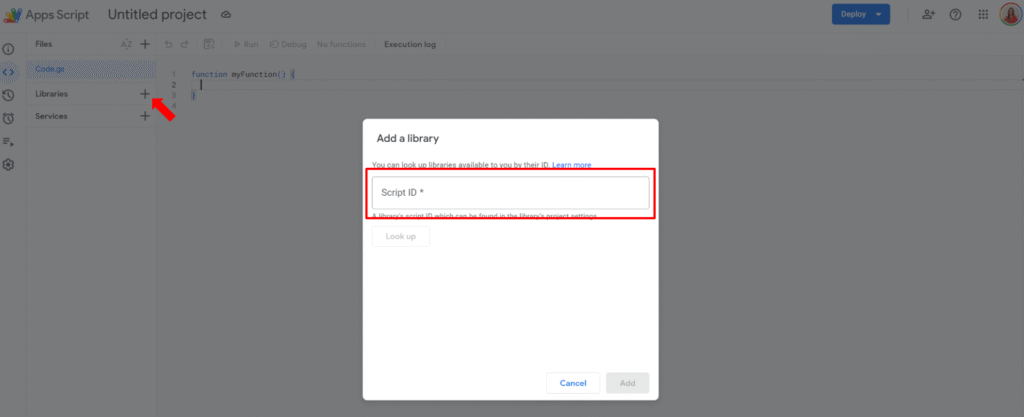
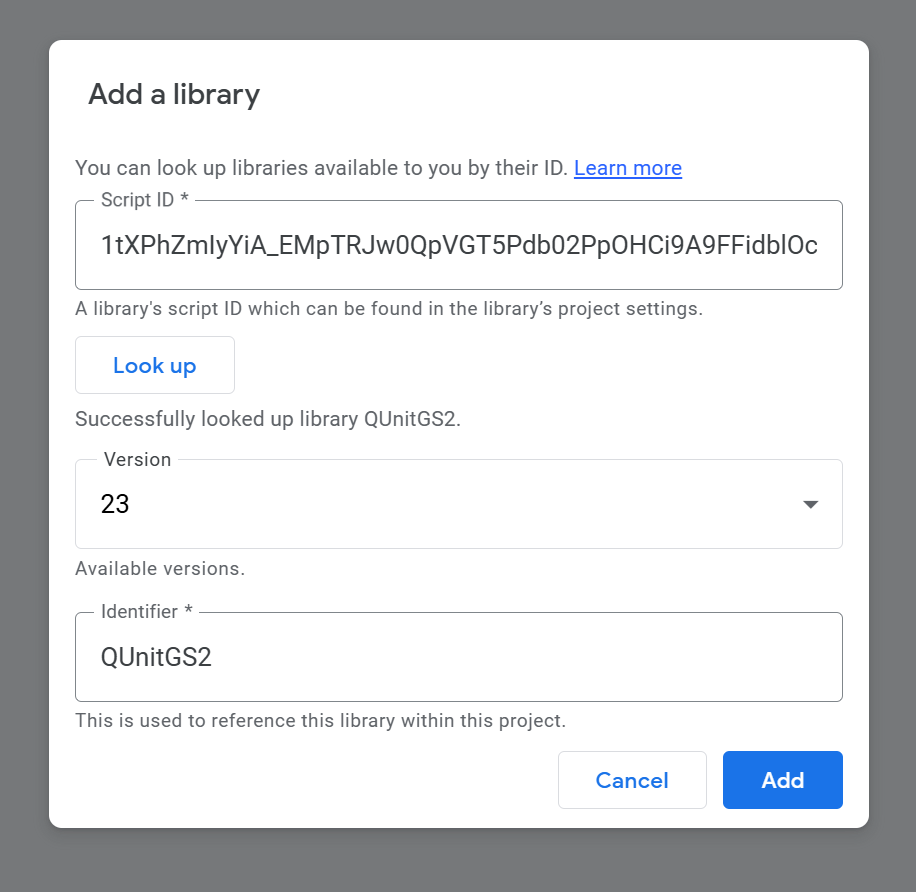
How to use QUnitGS2 / QUnit2GS to build a proper test suite in Apps Script
A lightweight console-based test runner that runs all test_ functions and logs PASS/FAIL in the execution log
By the end, you’ll have both a full-featured QUnit setup and a “zero-UI” runner you can use as a quick safety net in any project.
What is unit testing and why is it important?
Unit testing is the practice of testing small, isolated pieces of code (units), usually at the function level.
A typical unit test:
Calls a function with some inputs
Compares the result to an expected value
Fails loudly if they don’t match
In JavaScript (and therefore Apps Script), a unit test with QUnit looks like this:
QUnit.test('add() adds two numbers', (assert) => {
  const result = add(1, 2);
  assert.equal(result, 3, '1 + 2 should equal 3');
});
Why unit testing is especially useful in Google Apps Script projects:
Catch regressions early. When you refactor a Sheets automation or a Docs generator, tests tell you if something broke immediately instead of your users or clients discovering it later.
Refactor with confidence. You can rename functions, split files, change logic – and rely on tests as a safety net.
Executable documentation. A test like test_shouldApplyDiscountForTotalsOver1000 is more explicit than a vague comment buried in the code.
Faster debugging loops. Instead of manually re-running forms or simulating UI flows, you run the test suite and see exactly which scenario fails.
In “normal” JavaScript environments (Node/React), developers use tools like Jest, Mocha, QUnit, Ava… but Apps Script runs in a special environment that introduces a few constraints.
Limitations of Apps Script and existing unit testing solutions
Building a reliable unit testing structure in Google Apps Script (GAS) is essential for maintaining complex projects. But Apps Script is not a standard Node.js runtime:
No native local file system
No npm test directly inside the IDE
Limited setTimeout / async patterns
Heavy reliance on global services like SpreadsheetApp, DriveApp, MailApp, etc.
Because of that, unit testing solutions tend to fall into two big families:
In-GAS frameworks – tests run on Google’s servers inside the Apps Script runtime
Local testing – you pull code down with clasp and test it with Node tools, mocking Google services
Lightweight libs focused on simple assertions and PASS/FAIL logs in Logger.log.
Very easy to drop into any script, no web deployment required.
No GUI, you manage structure and conventions yourself.
Local testing with clasp + Jest/Ava
With the clasp CLI you can clone your Apps Script project locally, and then use any Node test framework you like (Jest, Ava, etc.) with mocks for Google services.
How it works
Use clasp to pull your code locally.
Write Jest/Ava tests.
Mock things like SpreadsheetApp and UrlFetchApp.
Run npm test locally.
Pros
Full Node ecosystem (TypeScript, Jest watch mode, coverage reports, CI/CD, VS Code integration).
Cons
Higher setup cost, especially for mocking Google services accurately.
Best suited to modular projects where business logic is already decoupled from Apps Script services.
Quick conclusion
If you want:
A visual, browser-based test runner → QUnitGS2 / QUnit2GS is an excellent choice
A blazing-fast, Node-like experience for pure logic → clasp + Jest is great.
A quick in-editor check that runs functions and logs results → a small custom console runner (or Utgs/bmUnitTest) is the most direct option.
In the rest of this article, we’ll combine both worlds:
QUnitGS2 for a “real” test suite with a UI
A tiny log-based test runner you can drop into any project
Classic unit testing principles in the Apps Script world
Before we jump into QUnit and custom runners, it’s worth aligning on some basic testing principles and how they apply to Apps Script.
AAA: Arrange, Act, Assert
A readable test follows the AAA pattern:
Arrange – set up inputs, initial state, mocks
Act – call the function under test
Assert – verify the result (return value or side effect)
Example (pseudo-code):
function test_addTwoNumbers() {
  // Arrange
  const a = 2;
  const b = 3;
  const expected = 5;

  // Act
  const actual = add(a, b);

  // Assert
  assert(actual, expected, 'add() should return 5 for (2, 3)');
}
Labeling those three steps makes your Apps Script tests much easier to read and maintain.
Isolation and dependency injection in Apps Script
True unit tests should focus on one unit of logic at a time. That’s tricky in Apps Script because your code often calls global services directly:
We’ll define a simple pure function to keep the focus on testing:
/**
 * Calculates the total amount after applying a percentage discount.
 *
 * @param {number} amount - Base amount before discount.
 * @param {number} discountPercent - Discount percentage between 0 and 100.
 * @return {number} The discounted amount, rounded to 2 decimals.
 * @throws {Error} If amount or discountPercent are invalid.
 */
function calculateDiscountedTotal(amount, discountPercent) {
  if (typeof amount !== 'number' || Number.isNaN(amount) || amount < 0) {
    throw new Error('amount must be a non-negative number');
  }

  if (
    typeof discountPercent !== 'number' ||
    Number.isNaN(discountPercent) ||
    discountPercent < 0 ||
    discountPercent > 100
  ) {
    throw new Error('discountPercent must be between 0 and 100');
  }

  const discount = (amount * discountPercent) / 100;
  const total = amount - discount;

  return Number(total.toFixed(2));
}
Wire up the QUnit web app
Add this in (for example) QUnitRunner.gs:
/* global QUnitGS2 */

/**
 * QUnit instance provided by QUnitGS2.
 * @type {QUnit}
 */
const QUnit = QUnitGS2.QUnit;

/**
 * Web app entry point that runs the QUnit test suite and returns HTML results.
 *
 * @param {Object} e - Web app request event.
 * @return {Object} HTML output with QUnit UI.
 */
function doGet(e) {
  QUnitGS2.init();

  registerTests();

  QUnit.start();
  return QUnitGS2.getHtml();
}

/**
 * Called from the client-side HTML to retrieve QUnit results
 * after the server-side test run completes.
 *
 * @return {Object} JSON results from the QUnitGS2 server.
 */
function getResultsFromServer() {
  return QUnitGS2.getResultsFromServer();
}
Define QUnit tests
Now create registerTests() and write your tests:
/**
 * Registers all QUnit test modules.
 */
function registerTests() {
  QUnit.module('calculateDiscountedTotal', () => {
    QUnit.test('returns original amount when discount is 0%', (assert) => {
      const result = calculateDiscountedTotal(100, 0);
      assert.equal(result, 100, '100 with 0% discount should stay 100');
    });

    QUnit.test('applies percentage discount correctly', (assert) => {
      const result = calculateDiscountedTotal(200, 10);
      assert.equal(result, 180, '10% discount on 200 should be 180');
    });

    QUnit.test('rounds to 2 decimals', (assert) => {
      const result = calculateDiscountedTotal(99.99, 5);
      assert.equal(result, 94.99, 'Should round result to 2 decimals');
    });

    QUnit.test('throws on negative amount', (assert) => {
      assert.throws(
        () => calculateDiscountedTotal(-10, 10),
        /amount must be a non-negative number/,
        'Negative amounts should throw'
      );
    });

    QUnit.test('throws when discount > 100%', (assert) => {
      assert.throws(
        () => calculateDiscountedTotal(100, 150),
        /discountPercent must be between 0 and 100/,
        'Discount > 100% should throw'
      );
    });
  });
}
Deploy as a web app and run tests
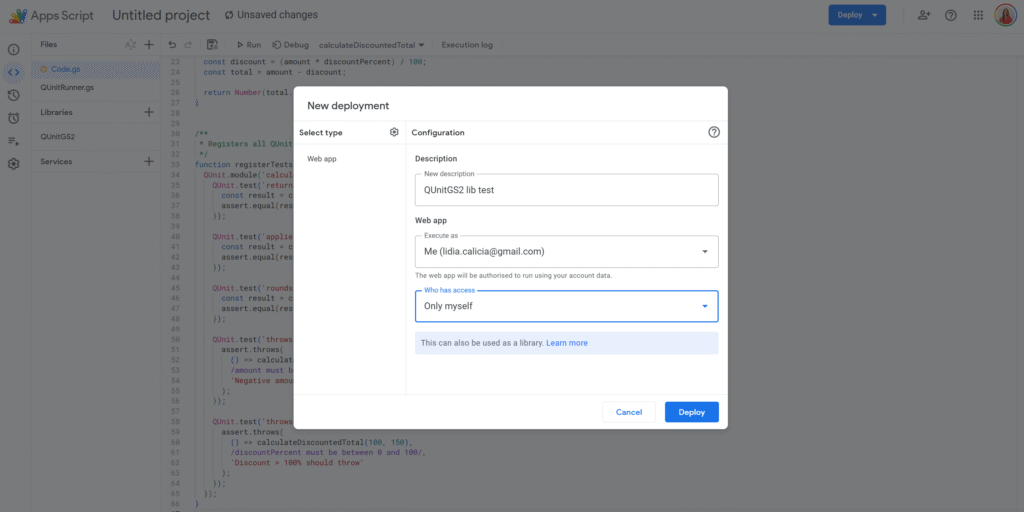
Deploy → New deployment → Web app
Execute as: your account
Who has access: as you prefer (e.g. “Only me”)
Copy the web app URL and open it in your browser
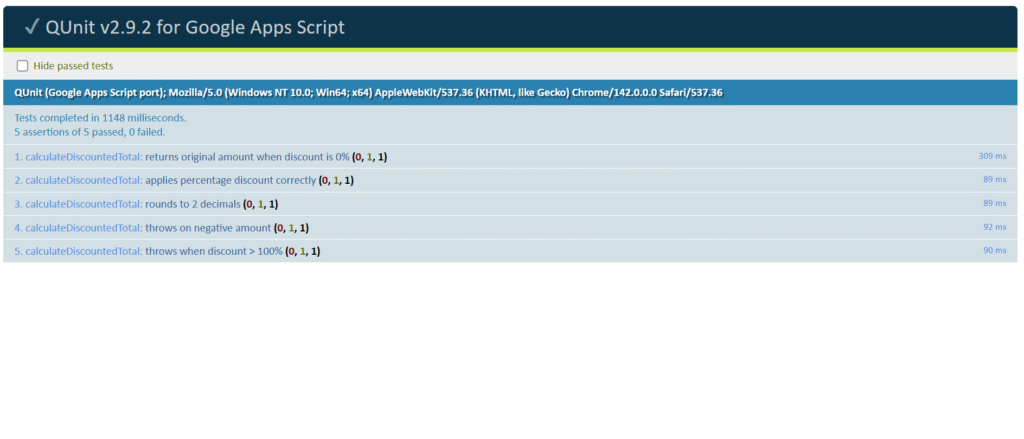
QUnitGS2 will:
Initialize QUnit
Run your registerTests()
Show a full QUnit HTML report with passing/failing tests
A simple console-based unit test runner (no web app required)
Sometimes you just want a quick pass/fail check in the Execution log without deploying a web app or integrating a full framework.
The script below implements a self-contained test runner that:
Looks for all global functions whose names start with test_
Runs them one by one
Logs PASS / FAIL and a short summary in the Apps Script execution log
// --- TEST UTILITIES: Place this in a file named 'TestRunner.gs' ---

/** @type {string} */
const TEST_PREFIX = 'test_';

/**
 * Checks if two values are strictly equal and logs a PASS/FAIL message.
 *
 * @param {unknown} actual - The value returned by the function under test (Act).
 * @param {unknown} expected - The predetermined correct value (Arrange).
 * @param {string} message - Description of the assertion.
 * @return {boolean} True if the assertion passes, false otherwise.
 */
function assert(actual, expected, message) {
  if (actual === expected) {
    Logger.log(`✅ PASS: ${message}`);
    return true;
  }

  Logger.log(`❌ FAIL: ${message} - Expected: ${expected}, Actual: ${actual}`);
  return false;
}

/**
 * Iterates through all global functions and runs those prefixed with 'test_'.
 * This acts as the central test runner.
 *
 * Run this manually from the Apps Script editor to execute the whole suite.
 */
function runAllTests() {
  Logger.log('====================================');
  Logger.log('🚀 STARTING UNIT TEST SUITE');
  Logger.log('====================================');

  let totalTests = 0;
  let passedTests = 0;
  let failedTests = 0;

  const globalScope = typeof globalThis !== 'undefined' ? globalThis : this;

  // Scan global functions and execute those starting with TEST_PREFIX.
  for (const key in globalScope) {
    if (Object.prototype.hasOwnProperty.call(globalScope, key)) {
      const candidate = globalScope[key];
      if (typeof candidate === 'function' && key.startsWith(TEST_PREFIX)) {
        const testName = key;
        Logger.log(`\n--- Running: ${testName} ---`);

        try {
          candidate();
          passedTests++;
        } catch (e) {
          failedTests++;
          const message = e instanceof Error ? e.message : String(e);
          Logger.log(`💥 ERROR in ${testName}: ${message}`);
        }

        totalTests++;
      }
    }
  }

  Logger.log('\n====================================');
  Logger.log(`RESULTS: ${totalTests} tests run`);
  Logger.log(`PASSED: ${passedTests}`);
  Logger.log(`FAILED: ${failedTests}`);
  Logger.log('====================================');
}
Paste TestRunner.gs into your Apps Script project.
Add tests by creating functions whose names start with test_ (in the same project).
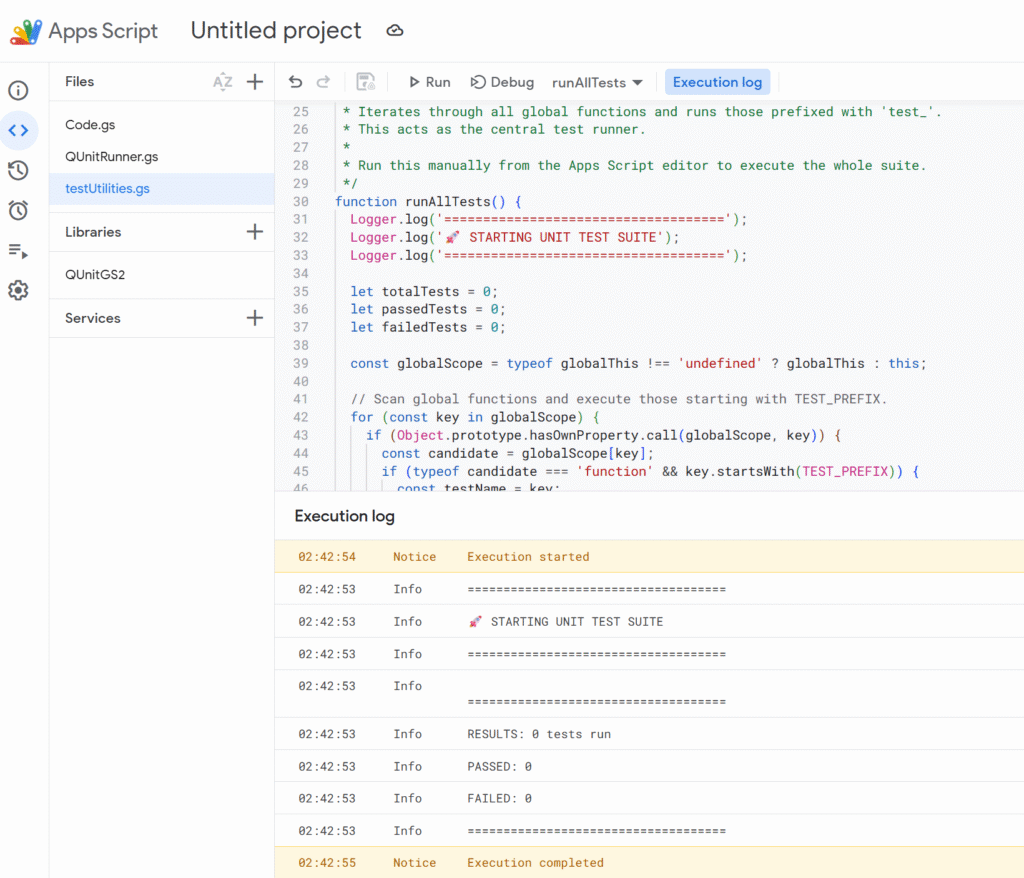
In the editor, select runAllTests and click Run ▶️.
Open View → Logs to see a step-by-step PASS/FAIL log and the final summary.
This gives you:
A very fast feedback loop while coding
No web app deployment required
A simple way to run a quick suite every time you touch the script
If you like this pattern, you can evolve it:
Add more assertion helpers (assertNotEquals, assertTrue, assertDeepEqual, …)
Add timing information per test
Exit early if a critical test fails (for long suites)
Putting it together
There’s no single “right” way to do unit testing in Google Apps Script, but a good strategy looks like this:
Use pure functions + dependency injection for your core business logic
Cover that logic with tests – either with QUnitGS2 (web UI) or your own console runner
Keep Apps Script service calls (SpreadsheetApp, DriveApp, etc.) thin and easy to mock
For bigger projects or front-end code, consider clasp + Jest and a local toolchain
Start small: pick one critical module (invoice calculation, validation rules, date logic…), write a handful of tests, and get used to running them every time you make a change.
Once you’ve seen a refactor go through while your QUnitGS2 panel and/or console runner stays fully green, you’ll never want to go back to “click Run and cross your fingers” again.
Google Sheets is amazing, until it isn’t. As your spreadsheets grow with formulas, collaborators, and live data, they can get painfully slow. Here are all the tricks I’ve found to help my clients get better performances.
Why Google Sheets Get Slow
Too many formulas, especially volatile ones (NOW(), TODAY(), RAND())
Large datasets (thousands of rows/columns)
Repeated or redundant calculations
Overuse of heavy formulas or IMPORTRANGE, ARRAYFORMULA, QUERY…
Dozens of collaborators editing simultaneously
Conditional formatting or custom functions on big ranges
Quick Fixes to Speed Things Up
✔️ Tidy Up Your Formulas
Start by removing or replacing volatile functions like NOW() or RAND() with static values when you don’t need them to update constantly. Use helper columns to calculate something once and reference that instead of repeating logic across rows.
Use fixed ranges (A2:A1000) instead of full-column references. Every formula referencing A:A makes Google Sheets look at all 50,000+ possible rows, even if you’re only using 1,000.
✔️ Lighten the Load
Think of your sheet as a backpack: if it’s stuffed with years of unused data and unnecessary features, it’ll be slow to move. Delete unused rows and columns. Archive old data to separate files. Keep the main spreadsheet focused on what matters now.
✔️ Be Visual, Not Flashy
Conditional formatting, while beautiful, is a silent performance killer. Use it selectively and avoid applying rules to entire columns or rows. Likewise, go easy on charts and embedded images. Move your dashboards to a separate file if needed.
Apps Script and Heavy-Duty Sheets
When dealing with large spreadsheets, your scripting strategy matters. Google Apps Script offers two main interfaces: SpreadsheetApp and the advanced Sheets API. While SpreadsheetApp is easier to use, it becomes painfully slow with big datasets because it handles operations cell by cell.
Instead, for serious performance, we lean heavily on the Sheets API and its batchUpdate method. This allows us to push changes to many cells at once, minimizing round trips and drastically speeding up execution.
Here’s a simple example that injects data into a large range using the Sheets API, not SpreadsheetApp:
// Example of data
const data = [{
  "range": "A35",
  "values": [["TEST"]]
}];

/**
 * Write to multiple, disjoint data ranges.
 * @param {string} spreadsheetId The spreadsheet ID to write to.
 * @see https://developers.google.com/sheets/api/reference/rest/v4/spreadsheets.values/batchUpdate
 */
function writeToMultipleRanges(spreadsheetId, data, sheetName) {

  let ssGetUrl = `https://sheets.googleapis.com/v4/spreadsheets/${spreadsheetId}`
  let options = {
    muteHttpExceptions: false,
    contentType: 'application/json',
    method: 'get',
    headers: { Authorization: 'Bearer ' + ScriptApp.getOAuthToken() }
  };
  let ssGetresponse = JSON.parse(UrlFetchApp.fetch(ssGetUrl, options));
  let sheets = ssGetresponse.sheets;
  let rowCount = 0;
  let sheetId = 0;
  sheets.forEach(sheet => {
    if (sheet.properties.title == sheetName) {
      rowCount = sheet.properties.gridProperties.rowCount
      sheetId = sheet.properties.sheetId;
    }
  });

  let num = parseInt(String(data[0]["range"]).split("!")[1].replace(/[^0-9]/g, ''));
  if (rowCount < num) {
    let diff = num - rowCount;
    let resource = {
      "requests": [
        {
          "appendDimension": {
            "length": diff,
            "dimension": "ROWS",
            "sheetId": sheetId
          }
        }
      ]
    };
    let ssBatchUpdateUrl = `https://sheets.googleapis.com/v4/spreadsheets/${spreadsheetId}:batchUpdate`
    let options = {
      muteHttpExceptions: true,
      contentType: 'application/json',
      method: 'post',
      payload: JSON.stringify(resource),
      headers: { Authorization: 'Bearer ' + ScriptApp.getOAuthToken() }
    };
    let response = JSON.parse(UrlFetchApp.fetch(ssBatchUpdateUrl, options));
  }

  const request = {
    'valueInputOption': 'USER_ENTERED',
    'data': data
  };

  try {
    const response = Sheets.Spreadsheets.Values.batchUpdate(request, spreadsheetId);
    if (response) {
      return;
    }
    console.log('response null');
  } catch (e) {
    console.log('Failed with error %s', e.message);
  }
}

/**
 * Converts a row and column index to A1 notation (e.g., 3, 5 → "E3").
 *
 * @param {number} rowIndex - The 1-based row index.
 * @param {number} colIndex - The 1-based column index.
 * @returns {string} The A1 notation corresponding to the given indices.
 */
function getA1Notation(rowIndex, colIndex) {
  if (rowIndex < 1 || colIndex < 1) {
    throw new Error("Both rowIndex and colIndex must be greater than or equal to 1.");
  }
  let columnLabel = "";
  let col = colIndex;
  while (col > 0) {
    const remainder = (col - 1) % 26;
    columnLabel = String.fromCharCode(65 + remainder) + columnLabel;
    col = Math.floor((col - 1) / 26);
  }
  return columnLabel + rowIndex;
}
Freeze Formulas
Often, you only need a formula to calculate once, not every time the sheet updates.
Instead of leaving it active and recalculating endlessly, you can use Apps Script to compute the values once and then lock them in as static data.
The script below is designed for that: it keeps the original formulas in the second row (as a reference and for future recalculations), then copies those formulas down the column, computes all results, and finally replaces everything below the second row with raw values. The result? A faster sheet that still preserves its logic blueprint in row two.
/**
 *
 */
function Main_Update_Formula_Data(ssId, sheet) {

  // Get formulas in first row
  const formulas = sheet.getRange(2, 1, 1, sheet.getLastColumn()).getFormulas()[0];

  // Get last row index
  const lastRowIndex = sheet.getLastRow();

  // Prepare ranges to treat
  const ranges = [];

  // Loop through formulas to expand until the end
  for (let i = 0; i < formulas.length; i++) {

    if (formulas[i] != ""
      && !String(formulas[i]).startsWith("=arrayformula")
      && !String(formulas[i]).startsWith("=ARRAYFORMULA")
      && !String(formulas[i]).startsWith("=ArrayFormula")) {

      const thisRange = {
        startRowIndex: 1,
        endRowIndex: lastRowIndex - 1,
        startColumnIndex: i,
        endColumnIndex: i + 1,
        formulas: [formulas[i]],
      };

      ranges.push(thisRange);
    }
  }

  // Inject and freeze data except first row of formulas
  injectAndFreezeFormulas(ssId, sheet.getSheetId(), sheet.getName(), ranges);
}


/**
 * Injects formulas into multiple ranges, waits for computation, then replaces them with static values.
 * @param {string} spreadsheetId - Spreadsheet ID.
 * @param {number} sheetId - Numeric sheet ID.
 * @param {string} sheetName - Sheet name (for value reads/writes).
 * @param {Array<Object>} ranges - Array of range configs like:
 * @return {void}
 */
function injectAndFreezeFormulas(spreadsheetId, sheetId, sheetName, ranges) {
  // --- Inject formulas via batchUpdate
  const requests = [];
  ranges.forEach(rangeDef => {
    const {
      startRowIndex,
      endRowIndex,
      startColumnIndex,
      endColumnIndex,
      formulas,
    } = rangeDef;

    formulas.forEach((formula, idx) => {
      requests.push({
        repeatCell: {
          range: {
            sheetId,
            startRowIndex,
            endRowIndex,
            startColumnIndex: startColumnIndex + idx,
            endColumnIndex: startColumnIndex + idx + 1,
          },
          cell: {
            userEnteredValue: { formulaValue: formula },
          },
          fields: 'userEnteredValue',
        },
      });
    });
  });

  Sheets.Spreadsheets.batchUpdate({ requests }, spreadsheetId);
  Logger.log(`Formulas injected into ${ranges.length} range(s)`);

  // --- Wait briefly to ensure calculations are done
  Utilities.sleep(1000);

  // --- Read computed values via API (valueRenderOption: UNFORMATTED_VALUE)
  const readRanges = ranges.map(r =>
    `${sheetName}!${columnLetter(r.startColumnIndex + 1)}3:` +
    `${columnLetter(r.endColumnIndex)}${r.endRowIndex + 1}`
  );

  const readResponse = Sheets.Spreadsheets.Values.batchGet(spreadsheetId, {
    ranges: readRanges,
    valueRenderOption: 'UNFORMATTED_VALUE',
  });

  // --- Reinject values (overwrite formulas)
  const writeData = readResponse.valueRanges.map((vr, idx) => ({
    range: readRanges[idx],
    values: vr.values || [],
  }));

  Sheets.Spreadsheets.Values.batchUpdate(
    {
      valueInputOption: 'RAW',
      data: writeData,
    },
    spreadsheetId
  );

  Logger.log(`Formulas replaced by static values in ${writeData.length} range(s)`);
}

/**
 * Helper — Convert a column index (1-based) to A1 notation.
 *
 * @param {number} colIndex - 1-based column index.
 * @return {string}
 */
function columnLetter(colIndex) {
  let letter = '';
  while (colIndex > 0) {
    const remainder = (colIndex - 1) % 26;
    letter = String.fromCharCode(65 + remainder) + letter;
    colIndex = Math.floor((colIndex - 1) / 26);
  }
  return letter;
}
Did you know all of these tricks? If you’ve got a favorite performance tip, clever automation, or formula hack, drop it in the comments! Let’s keep our Sheets smart, fast, and fun to work with.
Working with Google Apps Script and Google Forms often means mapping answers to the right question. For that, you need the question ID, a stable identifier that won’t change if you edit the title.
In this post, we’ll cover two simple ways to grab it: with Apps Script (getItems()) and via DevTools inspection of the live form. These methods are perfect for automation, building prefilled URLs, and keeping your form integrations reliable.
With Apps Script (getItems())
Use FormApp to loop through all items and match on the title. Great when you already know the exact question label.
/**
 * Return the question ID (string) that matches a given title.
 * @param {FormApp.Form} form
 * @param {string} questionTitle
 * @return {string|null}
 */
function retrieveItemId(form, questionTitle) {
  const items = form.getItems();
  for (let i of items) {
    if (i.getTitle().trim() == questionTitle.trim()) {
      return i.getId().toString();
    }
  }
  return null;
}
Why this is useful: you can rename a question in the UI without breaking scripts that rely on the ID later (IDs are stable; titles are not).
DevTools inspection (quick & dirty)
If you only need a question ID once and you have the live Google Form open, you can grab it straight from the page markup.
Steps:
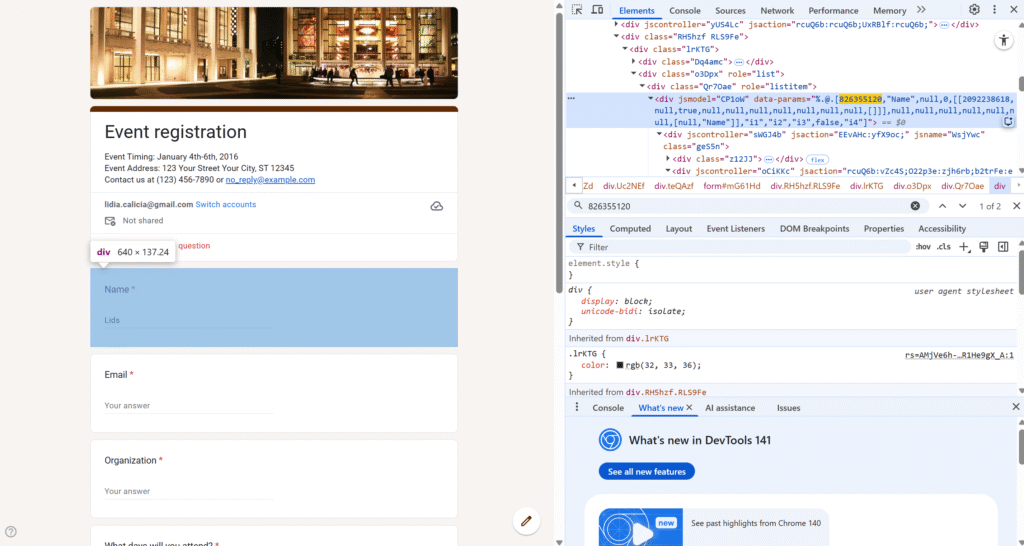
Open the live form (the “view” URL, not the editor).
Right-click → Inspect (Chrome DevTools).
Press Ctrl/Cmd + F and search for the exact question title (e.g., Name).
Look for a parent <div> with attributes like jsmodel and data-params. Inside that blob you’ll typically see both IDs:
The first number after the title block is the Apps Script itemId (what FormApp.getItems() returns).
Inside a nested array you’ll also see the prefill entry id used in URLs.
826355120 → itemId (returned by item.getId() in Apps Script)
2092238618 → prefill entry id (used as entry.2092238618=... in a prefilled link)
When to use this approach: fast, one-off lookup while you’re building your Apps Script, testing a prefilled URL, or debugging. Caveat: this relies on the page’s internal structure, which can change. For anything automated or repeatable, prefer Method 1 (FormApp) or Method 3 (Forms API).
Google Sheets drop-downs are a great way to control inputs and keep your data clean. A classic use case is to have different options for a drop down, depending on what was selecting in another.
That’s where dependent drop-down lists (also called cascading drop-downs) come in. For example:
In Drop-Down 1, you select a Region (Europe, Asia, America).
In Drop-Down 2, you only see the Countries from that region (Europe → France, Germany, Spain).
This guide shows you step by step how to build dependent drop-downs in Google Sheets — without named ranges, using formulas and a simple script for better usability.
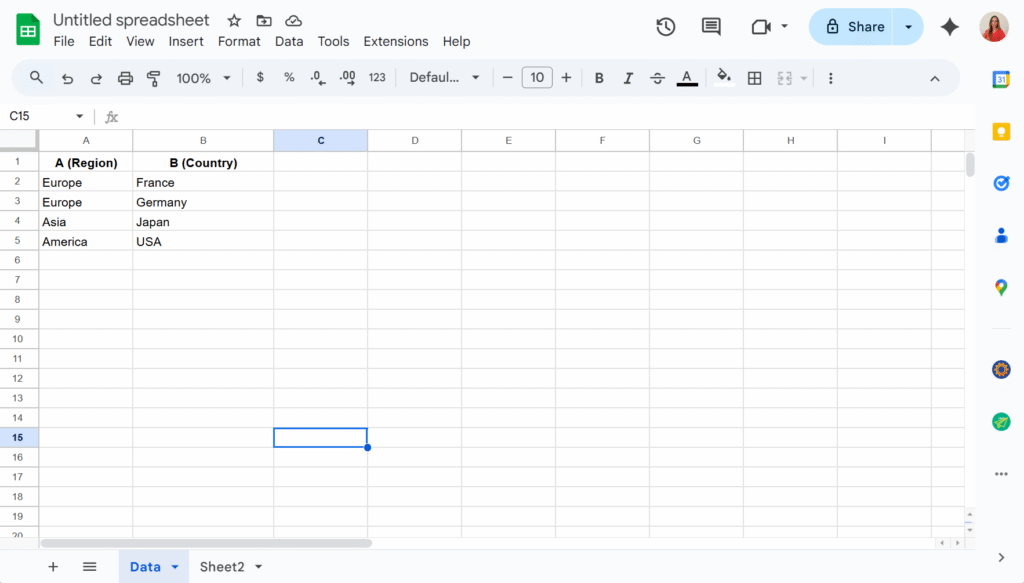
Step 1 – Organize your source data
On a sheet named Data, enter your list in two columns:
Important: Use one row per country (don’t put “France, Germany, Spain” in a single cell).
Step 2 – Create the drop-down lists
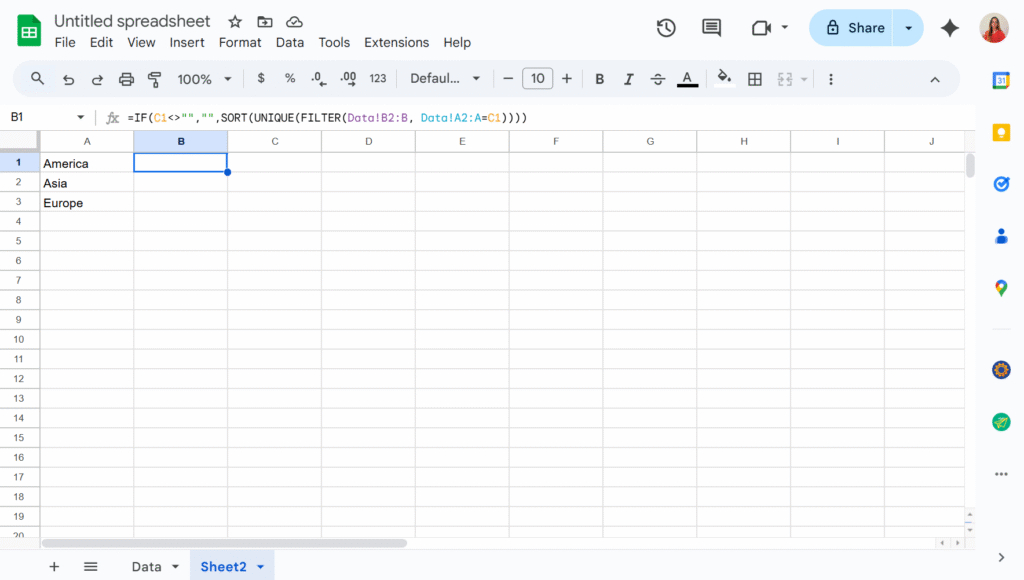
The key is not to link drop-downs directly to your raw lists, but to use formulas that generate the lists dynamically. These formulas can live on the same sheet as your data or on a separate one. In this example, I’ll place them in Sheet2 to keep the Data sheet uncluttered.
In A2, I will add the formula:
=SORT(UNIQUE(FILTER(Data!A2:A, Data!A2:A<>"")))
This way, the first drop-down will display a clean list of countries without any duplicates.
And in B2, assuming the country drop-down will be in C1 :
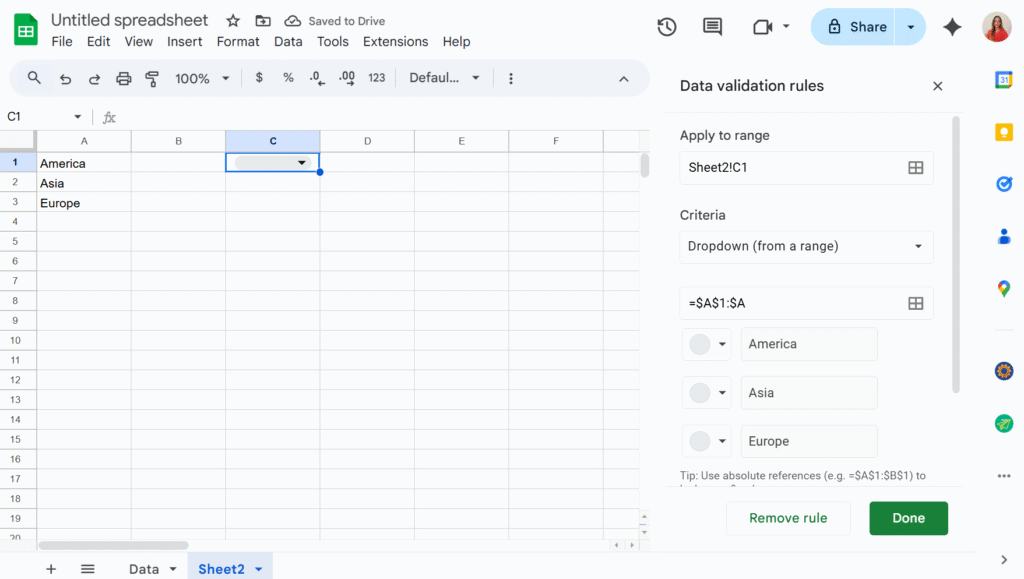
Now we can simply add two drop-downs in C1 and D1, using the “Dropdown from a range” option in the Data validation menu.
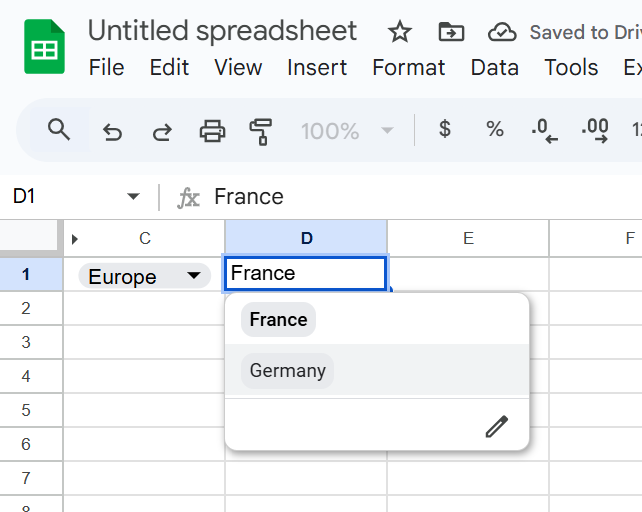
The second drop-down will now display only the values that match the selection from the first drop-down. You can then hide columns A and B to keep your sheet tidy — and voilà!
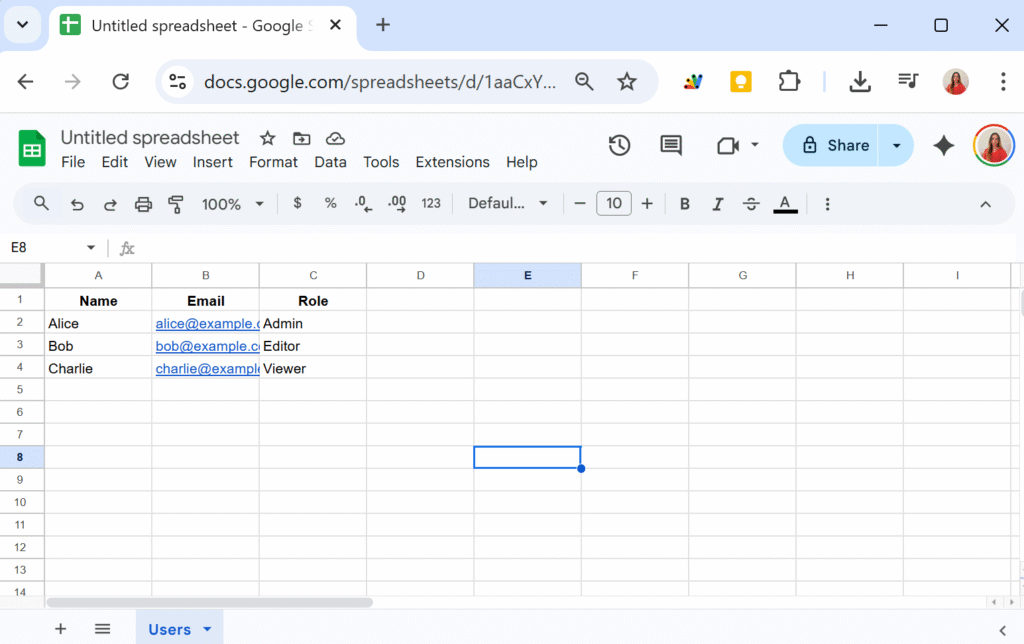
That format is fine for small scripts, but it quickly becomes messy. You end up with unreadable code like:
const data = sheet.getDataRange().getValues();
for (let i = 1; i < data.length; i++) {
  const name = data[i][0];
  const email = data[i][1];
  const role = data[i][2];
  // ...
}
Hard to read. Easy to break. And if someone reorders the spreadsheet columns, your code will suddenly pull the wrong data.
A Cleaner Way: Convert to Array of Objects
Instead of juggling indexes, let’s wrap the data in a class that automatically maps each row into an object , using the first row of the sheet as headers.
class Data {
  constructor(sheetName) {
    this.spreadsheet = SpreadsheetApp.getActiveSpreadsheet();
    this.sheetName = sheetName;
    this.sheet = this.spreadsheet.getSheetByName(this.sheetName);

    if (!this.sheet) throw `Sheet ${this.sheetName} not found.`;

    const data = this.sheet.getDataRange().getValues();
    this.headers = data.shift();
    this.rows = data.map(row =>
      row.reduce((record, value, i) => {
        record[this.headers[i]] = value;
        return record;
      }, {})
    );
  }
}
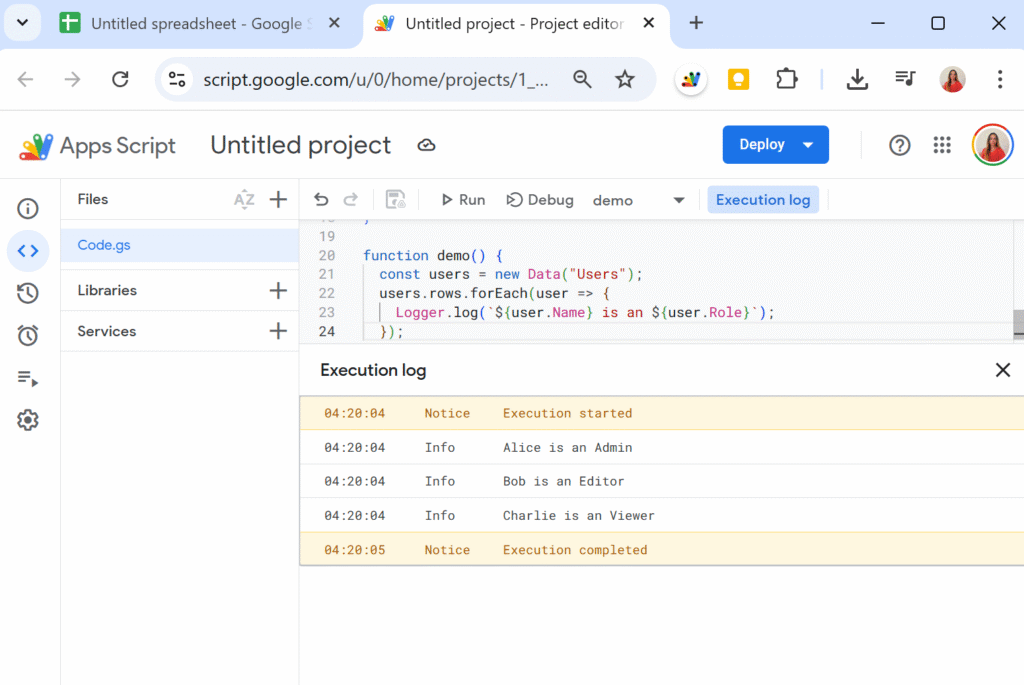
Now, when we create a new Data instance:
function demo() {
  const users = new Data("Users");
  Logger.log(users.rows);
}
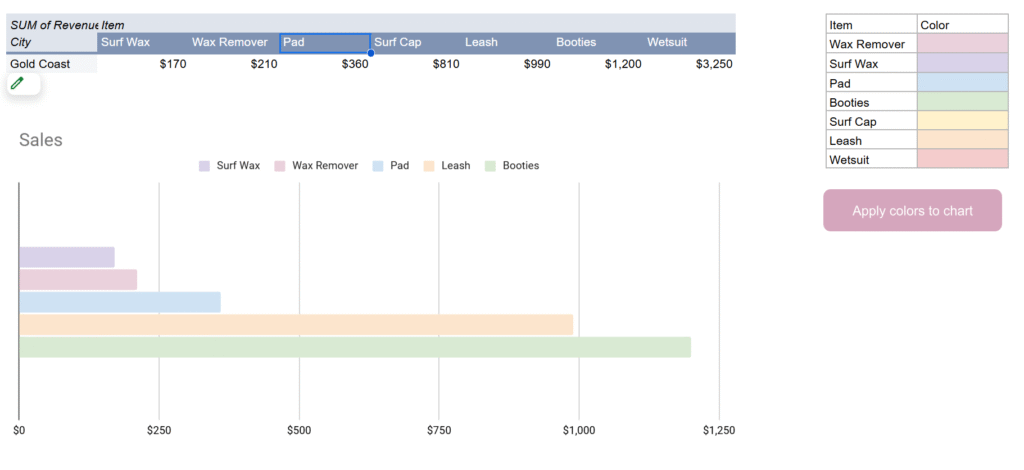
Have you ever noticed that chart colors in Google Sheets sometimes shuffle around when your data changes? This usually happens when you build a chart on top of a pivot table. If one of the series (like a product or category) isn’t present in the filtered data, Google Sheets automatically re-assigns colors.
The result: one week “Surf Wax” is blue, the next week it’s orange, and your report suddenly looks inconsistent. Not great if you’re sending charts to clients or managers who expect a clean, consistent palette.
In this tutorial, we’ll fix the problem once and for all by locking chart colors using the Google Sheets API from Apps Script.
Why the colors shuffle
Charts in Google Sheets don’t store colors per label by default, they store them per series position. So if your chart shows [Surf Wax, Leash, Wetsuit] this week, those get assigned colors 0, 1, 2. But if next week [Pad] is missing, everything shifts left and the colors move with them.
That’s why you see colors “jump” around when some categories are empty.
The fix: define your own color map
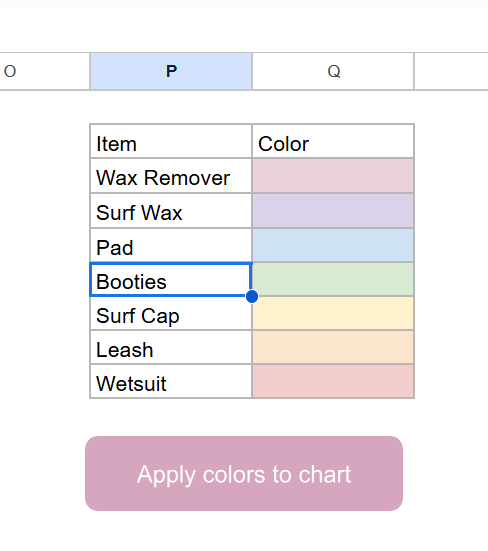
The solution is to create a color map table in your sheet that tells Apps Script what color each item should always use.
Example in range P2:Q:
The trick is that we don’t actually use the text in the “Color” column, we use the cell background color. This makes it easy to set and change colors visually.
Using the Sheets API to lock colors
The built-in SpreadsheetApp class in Apps Script doesn’t let us fully control chart series. For that, we need the Advanced Sheets Service (a wrapper around the Google Sheets REST API).
To enable it:
In the Apps Script editor, go to Services > Add a service > turn on Google Sheets API v4.
The Apps Script solution
Here’s the script that applies your custom colors to the first chart on the Sales sheet:
/**
 * Apply chart colors from mapping in P2:Q to the first chart in "Sales".
 */
function updateChartColors() {
  const ss = SpreadsheetApp.getActiveSpreadsheet();
  const sheet = ss.getSheetByName("Sales");
  const spreadsheetId = ss.getId();

  // 1. Build color map (Item -> hex from background)
  const mapRange = sheet.getRange("P2:Q");
  const values = mapRange.getValues();
  const bgs = mapRange.getBackgrounds();

  const colorMap = {};
  values.forEach((row, i) => {
    const item = row[0];
    const color = bgs[i][1];
    if (item && color && color !== "#ffffff") {
      colorMap[item] = color;
    }
  });

  // 2. Get chart spec from Sheets API
  const sheetResource = Sheets.Spreadsheets.get(spreadsheetId, {
    ranges: [sheet.getName()],
    fields: "sheets(charts(chartId,spec))"
  }).sheets[0];

  if (!sheetResource.charts) return;
  const chart = sheetResource.charts[0];
  const chartId = chart.chartId;
  const spec = chart.spec;

  // 3. Apply colors by matching series headers with map
  if (spec.basicChart && spec.basicChart.series) {
    spec.basicChart.series.forEach((serie, i) => {
      const src = serie.series?.sourceRange?.sources?.[0];
      if (!src) return;

      // Get header label (like "Surf Wax", "Leash", etc.)
      const header = sheet.getRange(
        src.startRowIndex + 1,
        src.startColumnIndex + 1
      ).getValue();

      if (colorMap[header]) {
        spec.basicChart.series[i].colorStyle = {
          rgbColor: hexToRgbObj(colorMap[header])
        };
      }
    });
  }

  // 4. Push update back into the chart
  Sheets.Spreadsheets.batchUpdate(
    {
      requests: [
        {
          updateChartSpec: {
            chartId,
            spec
          }
        }
      ]
    },
    spreadsheetId
  );
}

/**
 * Convert #RRGGBB hex to Sheets API {red, green, blue}.
 */
function hexToRgbObj(hex) {
  const bigint = parseInt(hex.slice(1), 16);
  return {
    red: ((bigint >> 16) & 255) / 255,
    green: ((bigint >> 8) & 255) / 255,
    blue: (bigint & 255) / 255
  };
}
How it works
Read the color map from P2:Q using the cell background color.
Fetch the chart spec from the Sheets API.
For each series, look up the header label from the pivot table (like “Wax Remover”).
If it exists in the map, apply the mapped color using colorStyle: { rgbColor: … }.
Push the modified spec back to the chart with updateChartSpec.
The result: your chart always uses the same colors, no matter which categories are present.
Wrapping up
With this approach, you’ll never have to worry about Google Sheets “helpfully” reshuffling your chart colors again. Once you set your palette in the sheet, a single click on a button can re-apply it to your chart. And because it uses the Sheets API directly, the colors are actually saved in the chart definition itself.
That means your reports stay consistent, your managers stop asking “why is Surf Wax orange this week?”, and your charts look clean and professional every time.
If you’re building Google Workspace Add-ons or Editor Add-ons, there’s a good chance you’ve encountered mysterious PERMISSION_DENIED errors, especially when using google.script.run in custom sidebars.
The kicker? The same code works flawlessly for some users, and fails catastrophically for others — without any obvious reason.
Welcome to the multi-account execution context problem.
In this article, I’ll break down:
When and why this error occurs
How to reproduce it
What you can do to avoid it (or at least handle it gracefully)
Ever wanted to track paragraphs in a Google Doc without adding visible clutter? Whether you’re syncing content with an external system, managing edits across collaborators, or linking comments to specific sections, this technique lets you embed invisible unique IDs inside your document using zero-width characters.
Let’s dive into how this works, and how you can use it in your own Docs.
Ever wished you could get an instant email when someone submits your Google Form complete with their answers and any files they uploaded? With a few lines of Apps Script, you can!
Let’s break it down
Why Use This Script?
This solution answers a common need: getting notified via email when someone submits a form response. Especially useful when:
You’re collecting job applications or portfolios.
You want to automate intake notifications.
Your form includes file uploads, and you want the file attached in the email.
In Google Apps Script, execution time matters. With quotas on simultaneous runs and total runtime, long or inconsistent function execution can cause failures or delays. This is especially important when using services like LockService, where you need to define realistic wait times.
This article shows how to track execution time and errors in your functions—helping you stay within limits and optimize performance as your scripts grow.